A username feels like a small decision, but it is one of the most visible pieces of information about you online. It appears in search results, comment sections, game lobbies and links that people share. Because it is public and often permanent, it deserves a few minutes of thought about privacy.
Why handles reveal more than you think
On its own, a handle may look harmless. The problem is that handles can be combined. Someone who sees “emma.cardiff2008” on one platform learns a first name, a city and a likely birth year. If the same name appears on a photo-sharing site and a forum, a person can connect the dots between accounts, even when each site shows only a little.
Information you share in a username cannot easily be hidden later. Even if you change it, old posts, screenshots and archived pages may keep the old version.
What to keep out of a username
- Your full name. Especially for accounts used by children and teenagers.
- Birth date or birth year. It is useful for identity checks and for guessing security answers.
- Exact location. A city can be fine for a local business, but a street, school or workplace is too specific.
- School, team or workplace names. These make it easy to find you offline.
- Phone numbers or parts of them.
- The first half of your email address. If your handle matches your email login, you have given away half of a login.
- Answers to security questions, such as a pet’s name or a mother’s maiden name.
Separate your identities
Many people benefit from having more than one identity:
- A public handle for work, hobbies and content that you are happy to share widely.
- A private handle for close friends and family, with locked settings.
- Throwaway handles for sign-ups where you do not need a lasting identity.
Keep these separate, which means different names, different photos and no links between them. If you use the same picture and bio everywhere, the separation disappears.
Protect the account, not only the name
A careful username does not help if the account is weak. Add these habits:
- Use a unique, long password for each account.
- Turn on two-step verification where it is available.
- Review which apps have access to your account.
- Check your privacy settings after every large app update.
Do an audit
You can check your current exposure in about ten minutes:
- Search for your main handle in a search engine, in quotation marks.
- Note every site where it appears and the details visible there.
- Look for personal information that a stranger could combine.
- Delete or tighten old accounts that you no longer use.
- If a handle reveals too much, change it and update your links.
Notes for parents and young people
Younger users deserve extra care. A good rule is that the handle should say nothing about age, school or town. Parents can help by choosing a name together, reviewing friend lists and explaining why personal details stay out of the name. If a stranger asks personal questions or tries to move the conversation to another app, it is a sign to stop and tell a trusted adult.
Styling and safety
Decorative Unicode letters do not affect safety, but they can create confusion in a different way: a name that cannot be typed is hard to report or block, and moderators may dislike it. Our article on Discord display names shows how to balance style and clarity.
Safer ways to be memorable
You can still have a distinctive handle without personal details. Combine a hobby with a word you enjoy, as shown in our guide on brainstorming a username you will not regret. If you are choosing a game name, our notes on gaming name ideas and rules apply the same thinking.
A good handle tells people what you are about and nothing about where to find you in person. That is the balance worth aiming for.
A ten-minute personal audit
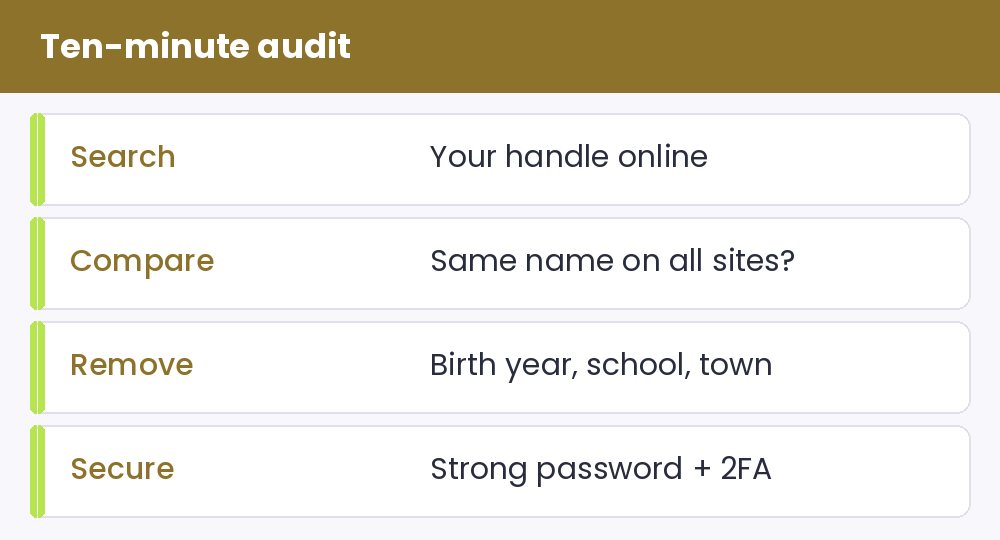
- Search for your main handle in a search engine and note every account that appears.
- Compare those accounts. If one name links your hobby profile to your school or workplace, treat that as a privacy risk.
- Look for personal details in each handle, such as a birth year, a school or a town.
- Check that every account has a strong, unique password and two-step verification switched on.
Doing this once a year takes minutes and prevents most of the problems people regret later.
What to do if you have already shared too much
Do not panic, because most of it can be fixed. Change the handle where the platform allows it, remove old posts that mention the details, and check which third-party apps are connected to the account. Tell trusted friends about the new name so they can find you again. Some platforms keep old names visible to people who already know them, so treat the change as a fresh start, not an erasure.
When you choose the new name, the username generator suggests options that contain no personal facts, and the stylish name art page lets you decorate a display name without revealing anything. Our fancy text generator can add style, but keep your handle plain and your personal details out of it.