Type “hello” and get “ollǝɥ”. Turn your phone upside down and it reads hello. It feels like magic. It’s actually a neat two-step trick, and it has nothing to do with rotating anything.
Step one: borrow lookalike letters
Nothing is being turned around. Instead, the generator swaps each letter for another character that happens to look like that letter rotated by 180 degrees. An a becomes ɐ, an e becomes ǝ, an h becomes ɥ, a y becomes ʎ. Some come from the phonetic alphabet, others from entirely different scripts. A few letters, like o, s, x and z, look much the same either way, so they stay as they are.
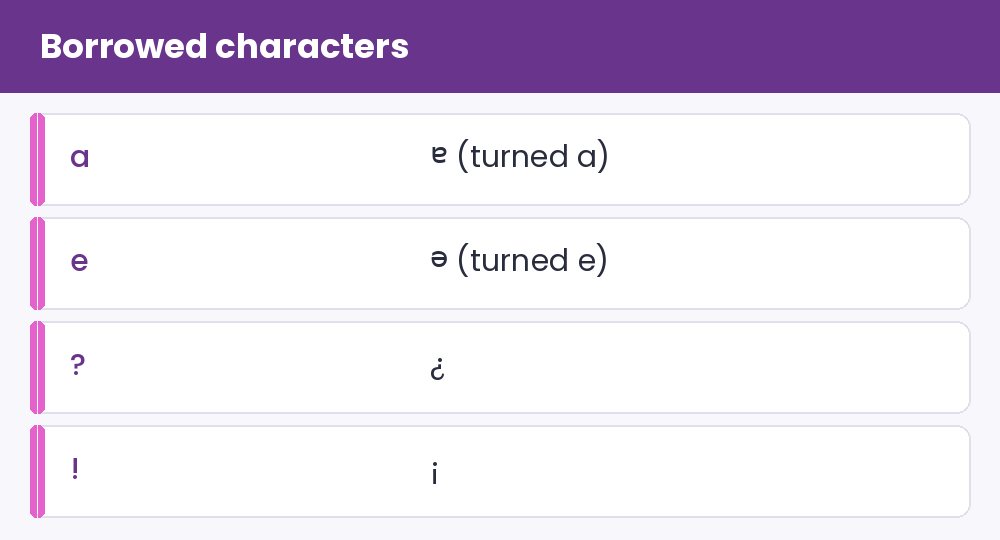
Punctuation gets the same treatment: a question mark becomes ¿ and an exclamation mark becomes ¡.
Step two: reverse the order
If you only swapped the letters, the word would still run left to right, and when you turned the phone it would read backwards. So the tool also reverses the whole line. The last letter comes first, the first letter comes last, and now it reads correctly from the other side.
Why a few letters look a little wrong
Unicode wasn’t designed for this, so the lookalikes are improvised. Some letters sit slightly higher or lower than the others, a few are a tiny bit too wide, and the occasional one is a bit of a stretch. It’s close enough for fun, but it’s the reason you’ll sometimes spot a letter that doesn’t quite fit.
Where it’s fun
- A silly line in a group chat or a caption.
- A playful bit of a bio, say a joke about being “upside down all day”.
- A gaming nickname that makes people look twice.
- A riddle or a puzzle: flipped text makes people stop scrolling.
- A fun message for a friend who’ll enjoy figuring it out.
Where to hold back
Don’t use it for long sentences. Reading flipped text is slow, and nobody wants to read an entire paragraph backwards. Don’t use it for anything important either, like addresses, times or instructions. Some of the borrowed characters are rare, so older phones may show boxes (more on that in this guide), and screen readers can make a mess of it, as explained in the accessibility article.
If you enjoy this kind of playful text, you’ll probably like the kaomoji and the emoji page too. Or go to the main generator and flip your own name.