On YouTube, people do not only discover channels through your videos. They also type names into the search bar, hear them in conversation and share them with friends. A channel name that looks stylish but cannot be searched or spelled quietly loses viewers. This guide shows how to choose a name and write an About section that work for both humans and search.
Three tests for a channel name
Before you commit, run your idea through three simple tests:
- The say-it test. Say the name out loud to someone. If they ask you to repeat or spell it, it may be too complicated.
- The type-it test. Type the name into YouTube search. Do you land on a different, larger channel? If yes, consider a more distinctive version.
- The remember-it test. Tell the name to a friend today and ask for it tomorrow. If they cannot recall it, simplify.
Why plain letters beat fancy letters in the name
A name written in decorative Unicode letters looks unique, but it creates a search problem. Typed letters and styled letters are different characters, so a viewer who types your name from memory will not match it. Screen readers may also read it badly. For these reasons, write the channel name in ordinary letters and keep style for supporting elements, such as a banner design or a short community post.
Writing the About section
The About section is where YouTube and viewers learn what you offer. Only the first couple of lines show before people tap to expand, so put the most important message there.
A reliable structure:
- Line one: who the channel is for and what it covers. “Simple home workouts for beginners over 40.”
- Line two: what viewers get and how often. “New video every Thursday, no equipment needed.”
- Next lines: a short story of why you make it, which builds trust.
- Contact: a business email for enquiries, only if you want them.
- Links: your website and other profiles.
Use the words people would actually type when searching, but write naturally. A paragraph stuffed with repeated keywords reads badly and can look spammy.
Handle and URL
YouTube channels also have a handle that starts with @. Treat it like a username: short, easy to spell, and consistent with your other platforms. If you use the same handle elsewhere, people who find you on one platform will find you on the others.
Where a touch of style fits
You can still have fun. Some good places for decoration are:
- Community posts, where a styled first word can catch the eye.
- Playlist names, used lightly, with the main word in plain letters.
- Banner and thumbnails, where real fonts are better than Unicode lookalikes anyway.
For video titles and descriptions, keep to plain letters, because that is where search matters most.
A short checklist
- The name passes the say-it, type-it and remember-it tests.
- The first two lines of About explain the channel clearly.
- Your handle matches your other platforms.
- Links work, and the email is one you check.
- Decoration appears around the text, not inside the keywords.
If you want to experiment with style for a community post, the fancy text generator is a quick place to test options, and the case converter lets you try title case and sentence case on video titles before you commit. For help with words, read how to write a one-line bio for a business or creator, which uses the same formula for channel descriptions.
The say-it-aloud stress test
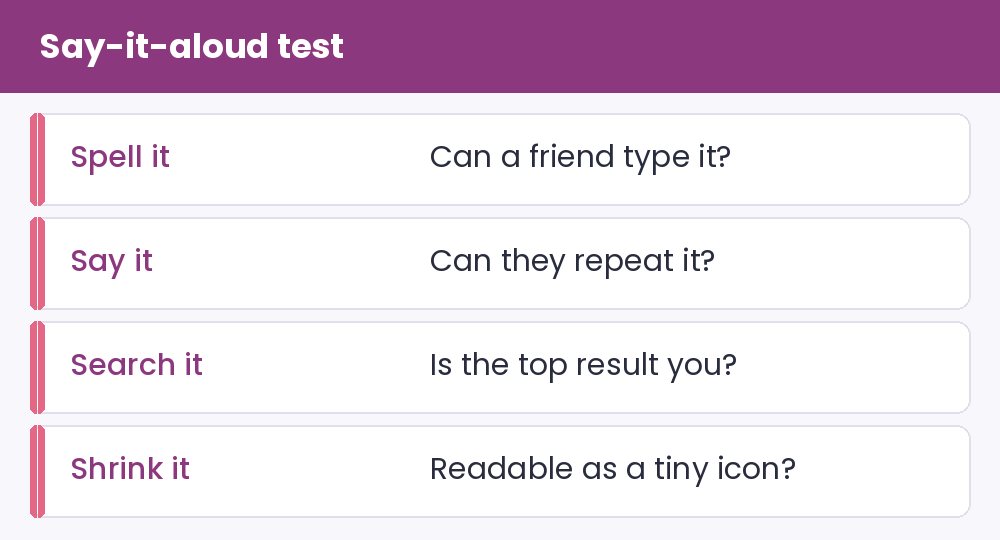
Most channels are discovered by word of mouth, not by browsing. Someone hears your name in a conversation, then has to type it. That moment is the real test. Say the name aloud to three people and ask them to write down what they heard. If any spelling differs from yours, you will lose some viewers every time the name is mentioned.
Then search for the name yourself. If other channels or products already own the top results, a slightly different name will serve you better than a clever one. Finally shrink your channel icon to the size of a postage stamp and check that the first letters still read clearly.
An About section in four sentences
- Who it is for and what it covers. Name the audience in plain words.
- What to expect. Mention the upload rhythm only if you can keep it.
- Why you. One honest detail about your experience or your mistakes.
- How to reach you. A business email or a link for collaborations.
Write it in normal sentences, because About text is read by people deciding whether to subscribe, not by a style judge. Fix awkward capitals with the case converter and borrow phrasing ideas from the bio ideas page, always rewriting them with your own details. A single divider from the symbols page between sections is plenty.
Frequently raised channel questions
Should my channel name contain keywords? Only if they fit naturally. A name like “Easy Home Workouts” tells people the topic, but forced keyword strings look spammy and are hard to remember.
How long should the About text be? Long enough to explain the channel clearly, which is often a short paragraph. The first two lines carry the weight, because most viewers will not expand it.