
If you’ve ever scrolled a character map looking for one particular arrow, you’ve probably wondered how anyone is supposed to find anything in there. The secret is that Unicode isn’t one big pile. It’s sorted into neighborhoods called blocks, and once you know a few, hunting for symbols gets a lot easier.
What a block is
A block is just a labeled range of code numbers, kept together because the characters belong together. All the arrows live in one place, all the math operators in another, all the box-drawing lines in a third. It’s like a library with shelves, instead of a heap of books on the floor.
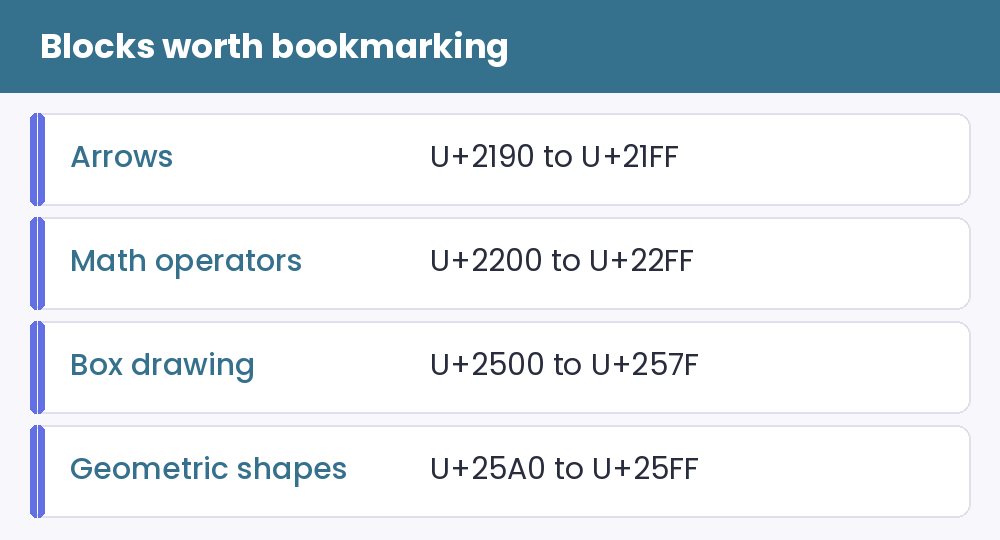
Four blocks worth bookmarking
- Arrows (U+2190 to U+21FF): → ← ↑ ↓ ⇒ ↩ and plenty of odd cousins.
- Mathematical Operators (U+2200 to U+22FF): ∞ ≠ ≈ ≤ ≥ √ ∑ and friends.
- Box Drawing (U+2500 to U+257F): ─ │ ┌ ┐ └ ┘ ━ for lines, borders and dividers.
- Geometric Shapes (U+25A0 to U+25FF): ■ □ ▲ ● ◆ ◇ for bullets and decoration.
There are many more, such as Dingbats (✂ ✈ ✔ ✿), Currency Symbols (₹ ₿ ₴), and Miscellaneous Symbols (☀ ☂ ♫ ☺). But those four will carry you a long way.
Why this is useful
Knowing that arrows are in one neighborhood means that if you need a rarely used arrow, you can browse the whole block instead of searching blindly. It also helps you troubleshoot. If one character in a block turns into an empty box, others from the same block may do the same.
Older blocks are safer
Characters that have been around for decades, like box drawing, arrows and basic shapes, display almost everywhere. Newer blocks, especially the ones with decorative alphabets, are more likely to fail on old phones. We go into this in the empty boxes guide. That’s one reason dividers made from box-drawing characters, as in this caption guide, are so reliable.
Blocks and fancy text
Fancy alphabets are a block too, called Mathematical Alphanumeric Symbols. That’s the one generators raid, and it’s explained in how generators work.
A habit worth building
Next time you need a symbol, look it up by its name, such as “right arrow” or “black star”, instead of by appearance. Names are much easier to search. Then browse the symbols page, the dividers or the ASCII art page to see these blocks in action.


