If you have ever scrolled through a character map looking for one particular arrow, you have probably felt lost. Unicode contains well over a hundred thousand characters, so it needs a system. The system is the block: a continuous range of numbers reserved for a related group of characters. Once you know the main blocks, finding symbols becomes much faster.
What a block is
Every Unicode character has a code point, written like U+2190. Blocks are labelled ranges of these numbers. A block usually has a theme, such as arrows or musical notation. Not every block is full, and a character does not always sit in the block you would guess, but the structure is a good map.
The most useful blocks for everyday text
- Arrows (U+2190 to U+21FF). Left, right, up, down, double arrows, curved arrows and loops. Examples: → ⇒ ↩ ↻.
- Mathematical Operators (U+2200 to U+22FF). Signs used in maths and logic. Examples: ∞ ≈ ≠ ∑ √.
- Box Drawing (U+2500 to U+257F). Lines, corners and joints that connect into frames and tables. Examples: ─ │ ┌ ┐ ╔ ╗.
- Block Elements (U+2580 to U+259F). Solid and shaded blocks used in simple graphics and bar charts. Examples: █ ▓ ░.
- Geometric Shapes (U+25A0 to U+25FF). Squares, circles, triangles and diamonds. Examples: ● ■ ▲ ◆.
- Miscellaneous Symbols (U+2600 to U+26FF). A mixed bag with weather, chess pieces, music and signs. Examples: ☀ ☂ ♞ ☮ ♫.
- Dingbats (U+2700 to U+27BF). Decorative characters, including checkmarks, crosses, stars and flowers. Examples: ✂ ✔ ✦ ❀.
Why knowing the family helps
Suppose you want a thicker arrow. You know arrows live in the Arrows block, plus a few neighbours such as Dingbats and Supplemental Arrows. In a character viewer you can jump to that area and browse a limited set instead of searching through everything.
How to browse blocks
- Windows Character Map. Search for “Character Map” in the Start menu. The Advanced view lets you group by Unicode subrange.
- Mac Character Viewer. Press Control, Command and Space, then open the category list.
- Online charts. The Unicode Consortium publishes code charts for each block, free to view.
- Our collection. The symbols page arranges many of these characters by theme, so you can copy them without hunting for the right block.
Older blocks are safer
Support differs by block. Blocks that have existed for decades, such as Arrows, Box Drawing and Geometric Shapes, are present in almost every font. More recent additions may be missing on older devices. If you want your decoration to look right for as many people as possible, choose symbols from the long-established blocks. For the details of what happens when a font lacks a character, see why fancy text turns into empty boxes.
Blocks and fancy text
The decorative letters you see in fancy text generators also come from blocks: Mathematical Alphanumeric Symbols for bold and script letters, Enclosed Alphanumerics for circled ones, and Combining Diacritical Marks for strikethrough and glitch effects. Our article on how fancy text generators work shows how a tool swaps one set for another.
A small practice exercise
- Open your character viewer and find the Arrows block. Pick three arrows you like.
- Find the Geometric Shapes block and choose two shapes.
- Combine them in a short divider, such as → ◆ ←, and paste it in a note.
- Test it on a second device to see whether all characters display.
This small exercise teaches you to navigate symbols by family, and that habit will serve you every time you build a bio, a caption or a name. If you enjoy the line-drawing characters especially, our guide to text dividers shows how to turn them into readable layouts.
Four blocks worth bookmarking
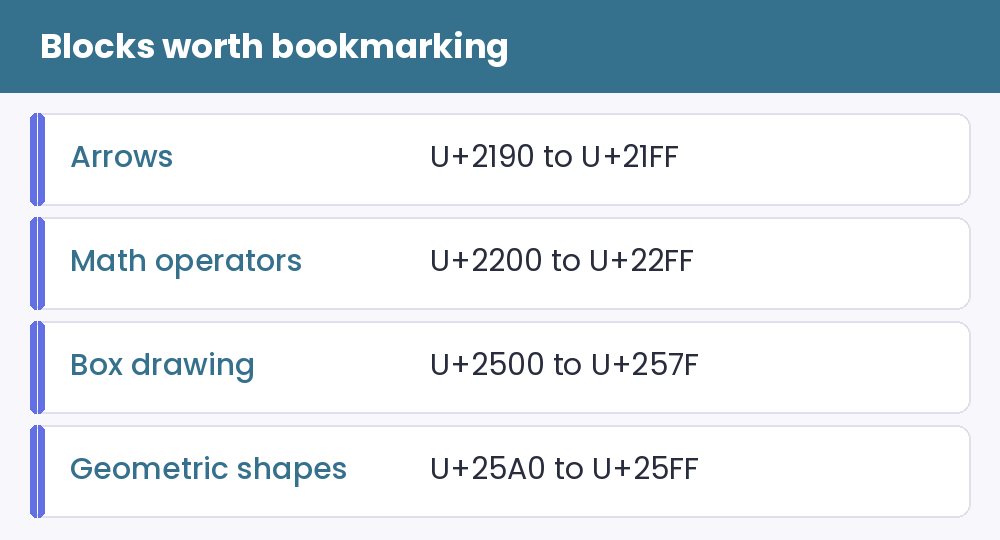
You do not need to learn the whole standard. Remember four neighbourhoods. Arrows live from U+2190 to U+21FF and give you directions, loops and pointers for calls to action. Mathematical operators sit between U+2200 and U+22FF with plus, minus, infinity and approximate signs. Box drawing characters run from U+2500 to U+257F and build lines and frames. Geometric shapes fill U+25A0 to U+25FF with squares, circles and triangles.
When you meet an unfamiliar symbol, knowing which block it came from tells you whether it belongs to a polished family or to a random corner of the standard.
A habit worth building: look characters up by name
Every character in Unicode has an official name, such as “rightwards arrow” or “black star”. Searching by name finds the right character faster than scrolling through a picture grid and helps you choose between near-identical shapes. It also reveals when two characters that look alike are actually different, such as a normal hyphen and a long dash.
Start in the symbols collection, which groups popular characters by category. For frames and separators, try the text dividers, and for pictures made of lines and shapes, visit the ASCII art page. Together they show how a handful of blocks can decorate a whole profile.
Lingering questions about Unicode blocks
Who decides what goes into a block? The Unicode Consortium reviews proposals and assigns new characters to the most suitable existing block, or creates a new one when a whole new group is needed.
Can I rely on every character in a block? Not on every device. Coverage depends on the fonts installed, so test anything important on a second phone.


